Backup & Restore
Protect your skills and recover from mistakes.
Overview
skillshare maintains automatic backups and provides manual backup/restore commands.
Automatic Backups
Backups are created automatically before:
skillshare sync(skill targets and agent targets)skillshare sync agents(agent targets only)skillshare target remove
Location: ~/.local/share/skillshare/backups/<timestamp>/ (agent backups appear as <target>-agents/ next to the regular <target>/ directories).
Scope: Only local target content is captured. Merge-mode symlinks are skipped because they point into your source — sync recreates them. See What Gets Backed Up.
Manual Backup
All targets
skillshare backup
Specific target
skillshare backup claude
Preview
skillshare backup --dry-run
List Backups
skillshare backup --list
Example output:
All backups in ~/.local/share/skillshare/backups (56.3 KB total)
─────────────────────────────────────────
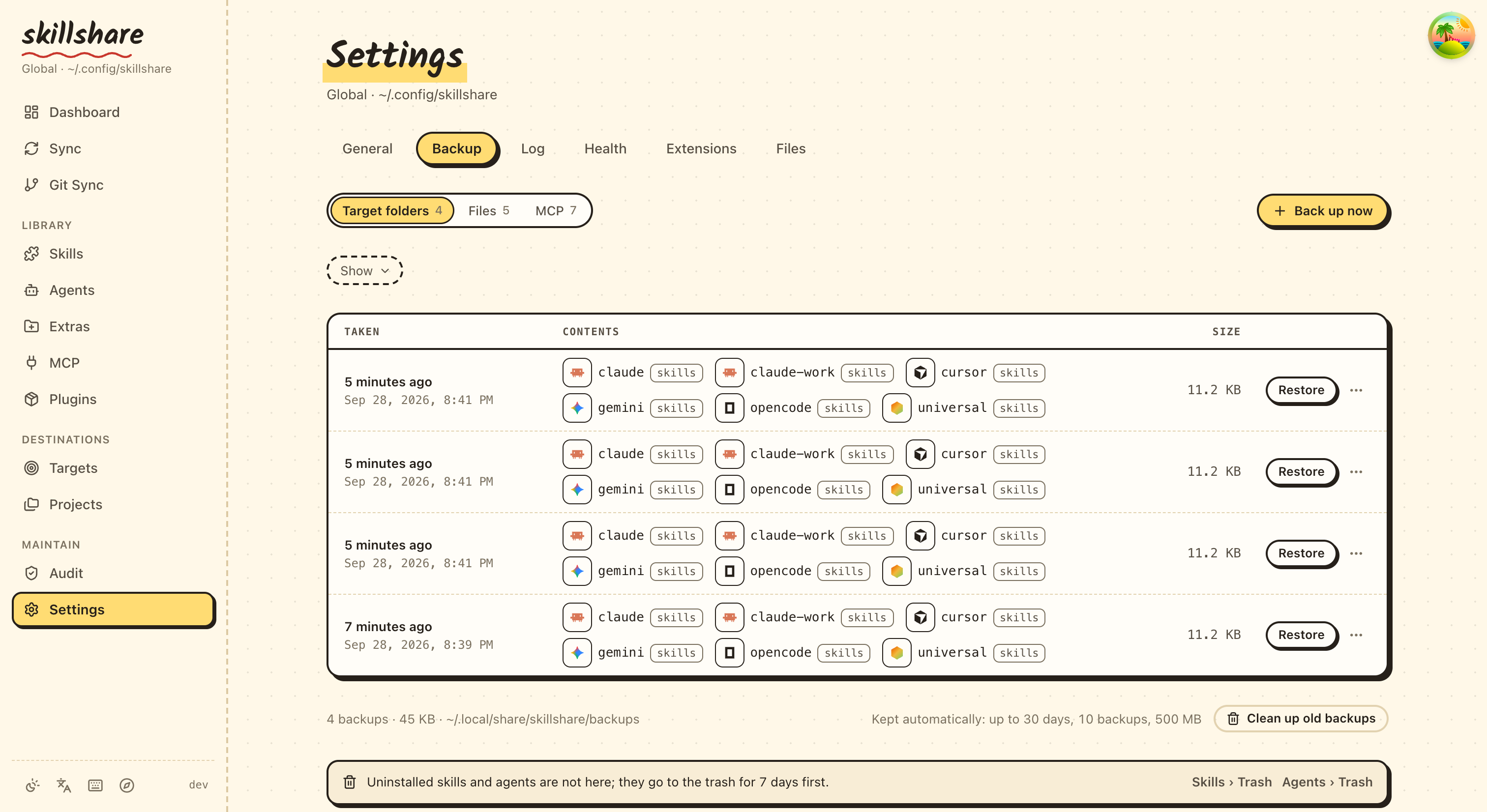
  2026-09-28_12-52-50  claude, claude-work, cursor, gemini, opencode, universal   11.3 KB  ~/.local/share/skillshare/backups/2026-09-28_12-52-50
  2026-09-28_12-41-50  claude, claude-work, cursor, gemini, opencode, universal   11.2 KB  ~/.local/share/skillshare/backups/2026-09-28_12-41-50
  2026-09-28_12-39-56  claude, claude-work, cursor, gemini, opencode, universal   11.2 KB  ~/.local/share/skillshare/backups/2026-09-28_12-39-56
In the dashboard, Settings → Backup → Target folders lists the same snapshots:
Restore
From latest backup
skillshare restore claude
From specific backup
skillshare restore claude --from 2026-01-19_10-00-00
Preview
skillshare restore claude --dry-run
What Restore Does
Note: After restore, the target contains real files (not symlinks). Run skillshare sync to re-establish symlinks.
Cleanup Old Backups
skillshare backup --cleanup
Removes backups older than the configured retention period. Retention already runs automatically after every sync, so this is only for pruning on demand.
To check how much space snapshots use:
du -sh ~/.local/share/skillshare/backups
skillshare backup --cleanup --dry-run   # Preview what would be removed
See Backups & Disk Space for how backup scope differs from .gitignore and ignore:.
Recovery Scenarios
Accidentally deleted a skill through symlink
# If git is initialized (recommended)
cd ~/.config/skillshare/skills
git checkout -- deleted-skill/

# Or restore from backup
skillshare restore claude
skillshare sync
Messed up sync mode
skillshare restore claude
skillshare target claude --mode merge
skillshare sync
Want to undo recent changes
skillshare backup --list
skillshare restore claude --from <earlier-timestamp>
Recover an agent
Agents have their own backup entries (<target>-agents) and follow the same flow as skills:
# Manual agent backup
skillshare backup agents claude

# Restore from latest
skillshare restore agents claude

# Restore from a specific timestamp
skillshare restore agents claude --from 2026-01-19_10-00-00
In project mode, only agents can be backed up or restored — skillshare backup -p agents works, but plain skillshare backup -p errors. See backup for the project-mode rule.
Get back an earlier version of a file
skillshare also keeps earlier versions of single files it rewrites, such as AGENTS.md, CLAUDE.md and the locations of shared files:
skillshare backup files                               # Files with saved versions
skillshare backup files show ~/.claude/CLAUDE.md      # Pick a version ID
skillshare backup files restore ~/.claude/CLAUDE.md <id>
The dashboard has the same under Settings › Backup › Files, with a diff before restoring. See File History.
Best Practices
Before risky operations
skillshare backup
After major changes
skillshare push -m "Major update" # Git backup
Weekly maintenance
skillshare backup --cleanup
Git as Backup
Git provides an additional backup layer:
# Recover deleted skill
cd ~/.config/skillshare/skills
git checkout -- deleted-skill/

# See history
git log --oneline

# Restore to previous commit
git checkout <commit-hash> -- specific-skill/
See Also
- backup — Backup command reference
- restore — Restore command reference
- trash — Soft-delete management
- Troubleshooting — When things go wrong